 Saasy
Saasy
Walk the classroom without leaving your desk. With Assure now in Toddle, teachers see student screens and manage website access right where they teach.
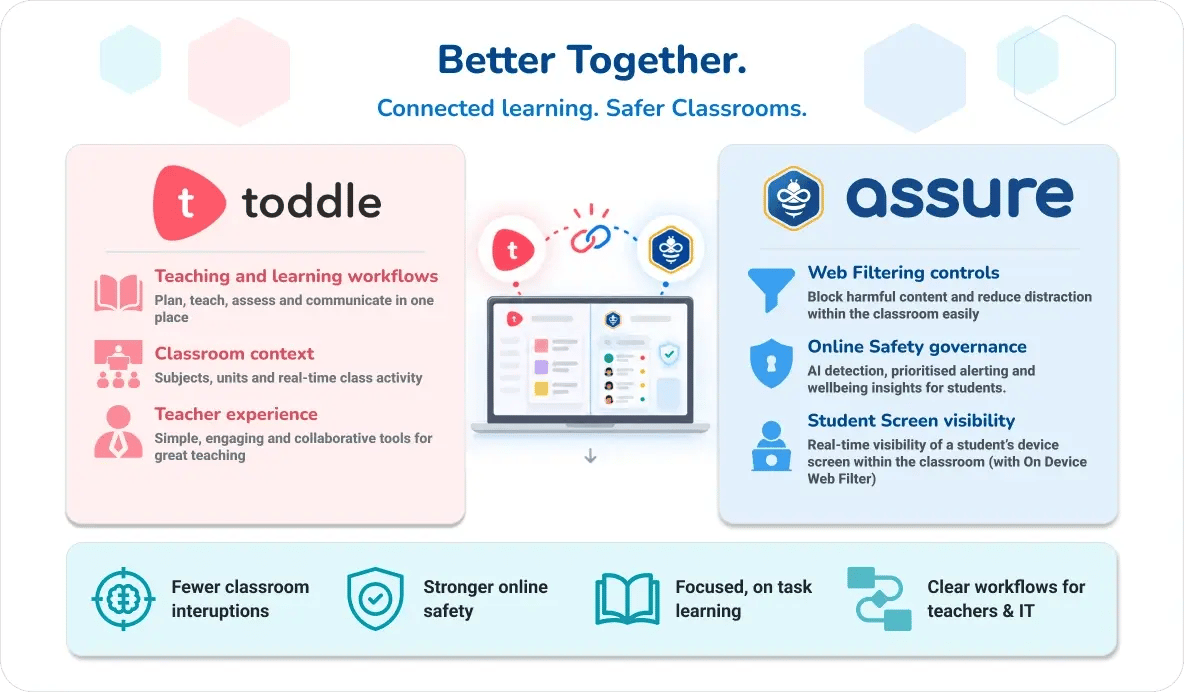
Schools using Toddle can now bring Assure’s web filtering and classroom monitoring tools directly into their teaching workflow. With the Assure LMS Connector, teachers can manage access to online resources, monitor student screens and respond to classroom needs in real time, all without leaving the platform they already use to plan and deliver learning.
The Toddle integration joins Saasyan’s growing list of LMS integrations, which reflects our commitment to meeting schools where they already work. Each integration brings classroom web filtering, student device visibility and temporary access management into the systems teachers use every day. Teachers spend less time switching between platforms or waiting on IT for routine adjustments.
Classroom web filtering, right inside Toddle
Authorised teachers can apply temporary web filtering rules from within Toddle, allowing or blocking websites, applications or web categories for their current class. For example, a teacher might:
- Open access to a specific research site for a lesson
- Block a distracting application during independent work
- Restrict a category of websites while students complete an assessment
Because these rules can be set to expire, a change made for one lesson does not turn into a permanent policy across the school. IT teams keep responsibility for the school’s broader web filtering setup, while teachers handle the adjustments that belong in the classroom.
Student Screen monitoring with Live View Desktop
For schools using the Assure On-Device Web Filter, the Toddle integration also supports Live View Desktop. Available for Windows and macOS, it works much like a teacher walking around the classroom and glancing at student screens, except now the teacher can do it from their own desk.
With Live View Desktop, teachers can:
- See what is on student screens as the lesson unfolds
- Spot off task or inappropriate activity quickly
- Know when to step in and speak with a student
Teachers get the same awareness they would have from moving around the room, while Assure continues to provide the broader oversight, reporting and governance schools rely on.
on meeting these obligations.
Benefits of Toddle integration for Assure Schools
- More focused learning: Classroom monitoring helps teachers notice when students drift off task and follow up with them directly.
- Faster response: Teachers can address access issues and distractions as they arise, so lessons stay on track.
- Clear roles: Teachers manage approved classroom controls, and IT maintains central web filtering policies and technical governance.
- Stronger online safety: Teachers see classroom activity in context, and broader concerns are escalated through the school’s online safety and wellbeing processes.
Supporting a whole school approach to online safety
Effective online safety in schools takes more than blocking websites. It depends on teachers, IT, wellbeing staff and school leaders each playing their part. By connecting the learning context in Toddle with Assure’s web filtering, classroom monitoring and Live View Desktop, the integration helps everyone do exactly that. Teachers respond to what is happening in their classroom, IT keeps central control, and wellbeing and leadership teams keep the visibility they need to support students.
Getting started with Assure for Toddle
To learn more about enabling the Toddle integration or planning a rollout for your school, please reach out to us at Saasyan or contact your Saasyan Reseller Partner .